Now we’re not suggesting that automatically improving your Excel skills will increase your salary this much, but it’s a very practical place to start!
Our experience has shown that the people with the best Excel skills in any team often are given more opportunities to use their Skills. More opportunities can open more doors for career progression.
Our course has been carefully crafted to get your Excel skills to an advanced level in just 7 hours. This can be achieved in a weekend or a few evenings.
Or perhaps by watching the lessons on your morning commute!
Why not free resources like YouTube and Google.
We don’t recommend unstructured and unaccredited resources like YouTube and Google. People are drawn in by high YouTube views and positive comments, but these are not a measure of how good the quality and usability of the information is. Often YouTubers are creating infinite content, most of which is unnecessary fluff in order to generate lots of views as that is how they earn money (through advertising revenue earned by gaining lots of views).
Combined with the positive comments, mostly from beginners who aren’t able to evaluate the quality of information and simply are grateful for the free education it can end up being a misleading learning experience.
There is no such thing as free training online
So called free training which is not optimal or delivered by work-inexperienced youtubers will cost you your time. If you don’t like our training we will happily refund you your $7 in 30 days but if the ‘free’ content on YouTube and Google doesn’t improve you, then you will NEVER get your time back!
Our course is not only structured appropriately to give you an optimal learning path but it’s also gone through a rigorous accreditation process by the Global CPD standards office, so you can rest assured knowing what you are learning has been thoroughly vetted
Despite this, we are still only selling the course for $7!
How can we offer the training so cheaply?
Well as the video below will tell you, the cost of the technology to deliver such training has drastically reduced over the last few years and combined with our lack of greed, we are practically breaking even to get this training to you!
100,000+ people have used this course. Get certified and dominate Excel in 7 hours for only $7
This course that will show you how to get the best out of Excel and can be completed in under 7 hours!
Buy our complete Excel 2019 course for $7 which comes with an accredited certificate.
What You'll Learn in this Course
Creating Charts
Earn an Accredited Certificate.
© 2021 Earn And Excel. All Rights Reserved.

Pivot Tables, Power Query and Dashboards
Macros & VBA to really speed up your work!
... and much more!
Some of the Companies Our Students Work At

We are accredited by the CPD Standards Office

Frequently Asked Questions
How do you deliver your courses?

Once you have signed up then we will send you an email with a link to access our training dashboard, you can access all of our courses from this dashboard. All courses consist of video lessons that can be viewed on your device of choice and also to truly enhance your learning you will access lots of exercise files relevant to the lessons.
Are you certified by a governing body? *
We are fully accredited by the CPD (Continuing Professional Development) governing body. The CPD Certification Service is the independent CPD accreditation center working across all sectors, disciplines and further learning applications in the UK.
There are many options these days to learn, why go with your courses?
Great question, well frankly we make the best courses because all of our trainers have spent 10+ years using these skills in the real world! True knowledge is passed on from people who have been in the trenches, putting in long hours, solving real problems creatively. Our mission is to empower you with the very best of what works and more importantly, leave out what is unnecessary and thus a waste of your precious time.
How long will it take to learn these skills?
It depends on your level of commitment. Our students have seen incredible results from as little as 30 minutes a day. But remember the magic is in applying the skills as much as learning them. Our courses are designed with this in mind. On the very practical end we have students who squeeze in a few mins here and there on their commute and some do dedicated 2-3 hour weekend sessions. One of our most successful students Jayne managed to get up at 4am to do her learning! This paid off massively as it landed her a six figure analyst job in a bank!
Can my employer pay for my training?
Yes, this is quite common since we focus on helping actual corporate employees. Note that for teams we offer bulk discounts. However, this needs to be done with a corporate credit/debit card. We don’t accept transfer/remittances. Get in touch if you have any specific questions.
Do you have a refund policy?
Yes, we do, we will dust it off if you need it because it rarely happens! You have 30 days to let us know that the training isn’t right for you and we will happily refund.
How much does it cost to take your courses?
You can either purchase access to one course or all of our courses, which are listed above. What we have done in a post COVID-19 world is to keep our prices low to accommodate as many ambitious people from all over the world who are looking to upskill through our high level courses without the burden of high expense.
How to use Excel
Functions, Ranges and Shortcuts
Printing, Formatting and Conditional Formatting
Data Analysis: Text, Formulas & Logic
Skill Level: Beginner to Advanced
Language: English
Lessons: 82
Videos: 6 hours and 44 minutes
Certificate: Get a certificate of completion accredited by the CPD* that can be displayed on LinkedIn
Versions: The course is created in Excel 2019 (365) but works in Excel 2016, 2013, 2010, and 2007
Course Modules
MODULE 1
1.1 Introduction
1.2 Overview
MODULE 2
2.1 Combine what you can enter in a cell
2.2 Relative and Absolute Cell Referencing
2.3 Entering Formula
2.4 Order of Operations
2.5 Date Serial Numbers
MODULE 3
3.1 Copy and Drag
3.2 Working with rows and columns
3.3 Working with sheets
MODULE 4
4.1 Functions
4.2 SUM Function
4.3 Copy and Drag Formula
4.4 More Basic Functions
4.5 Named Ranges
4.6 Names Constants and Formula
4.7 Shortcuts
4.8 More Shortcuts
MODULE 5
5.1 Formatting Font
5.2 Formatting Alignment
5.3 Formatting Borders
5.4 Formatting Numbers
5.5 Conditional Formatting Pre-Configured
5.6 Conditional Formatting with Formula
5.7 Conditional Formatting Dialogue Box Formula Trick
MODULE 6
6.1 Icons Shapes and Formatting
6.2 Printing Page Layout
6.3 Printing Headers Footers
MODULE 7
7.1 Data Sort
7.2 Filtering
7.3 Tables
7.4 Text to Columns
7.5 Flash Fill
7.6 Data Validation
7.7 Group and Outline
7.8 Freeze Panes
MODULE 8
8.1 Relative and Absolute Referencing
8.2 VLOOKUP
8.3 Index Match
8.4 IF
8.5 Nested If
8.6 Countif Countifs
8.7 SUMIF SUMIFS
8.8 LEN
8.9 RIGHT LEFT MID
8.10 SEARCH
8.11 Common Error Types
8.12 IFERROR
MODULE 9
9.1 Chart Basics
9.2 Chart Series and Column Charts
9.3 Bar Charts
9.4 Pie Charts
9.5 Composite Charts
MODULE 10
10.1 Power Query Intro
10.2 Power Query Consolidation
10.3 Pivot Tables
10.4 Setting up a Pivot Table
10.5 Pivot Table Field Settings
10.6 Pivot Table Calculated Fields
10.7 Pivot Table Groupings
10.8 Pivot Table Slicers and Timelines
10.9.1 Dashboards Part 1
10.9.2 Dashboards Part 2
MODULE 11
11.1 What is a macro?
11.2 Recording a Macro
11.3 Relative and Absolute Macros
MODULE 12
12.1 Introduction to VBE
12.2 Object Model
12.3 Module Worksheets Classes
12.4 Variables and Constants
12.5 vba Formatting
12.6a If Statement
12.6b Select Case
12.7a For Loop
12.7b DoWhile DoUntil Loop
12.7c ForEach Loop
12.8a Errors
12.8b Errors
12.9 Consolidate
This course has been designed and delivered by Sohail (from the video above) and Andrew, who have a combined experience of 40 years of using Excel in the workplace. Quite simply we are leading authorities in the world of practical usable Excel skills in the workplace.
Our Experience has shown us that not all features and functions of Excel are useful to the average person using the App. We have applied the infamous 80:20 rule to focus you on the 20% of Excel features that will give you 80% of the results.
We don’t just teach you the functions of Excel, we will show you how to become significantly more productive in Excel
So, we are able to cut through the fluff and you from a complete beginner to an advanced user in just under seven hours!
The tremendous impact of Excel skills on your career
There are an estimated 1.2 billion users of Excel in the world with the vast majority having below average skills who just get by
A quick search on Indeed.com shows that there are over 779,000+ Job in the US that require Excel Skills (which is subject to change but it’s usually 500K+ at any given time). As you can see from the screen shot below (from January 2022), the top jobs requiring Excel skills have an average salary of $59K+, not bad!
But check this out…
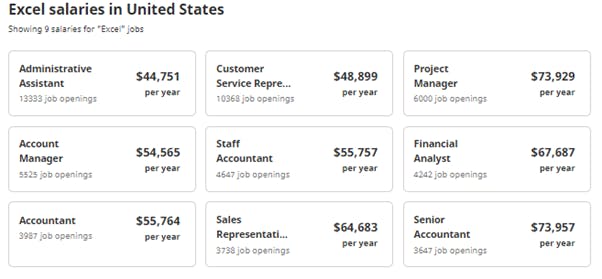

The Average salary for the top jobs requiring Advanced Excel skills is $72K+, that's an extra $13K !


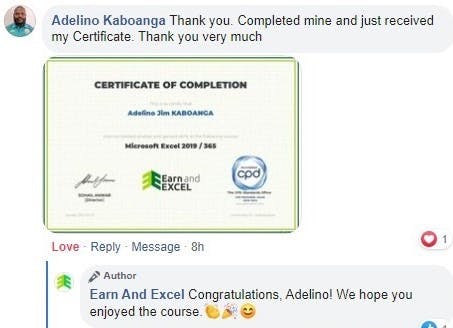
What Our Students are Saying
Some of the Companies Our Students Work At
Frequently Asked Questions
© 2021 Earn And Excel. All Rights Reserved.


